
SAP Fiori Elements is a framework developed by SAP that helps streamline and simplify the creation of user interfaces for SAP applications. It provides pre-defined templates and guidelines for building consistent and user-friendly web applications. In this article we will highlight the advantages and the challenges to use this technology.
Originally, SAP Fiori Elements was released back in 2015 under the name “Smart Templates”. Over the years, the following advantages have been shown in projects:
Accelerated Implementation
- Rapid Application Development: Fiori Elements significantly accelerates application development by providing ready-to-use templates and components. Developers can quickly create applications without having to build everything from scratch.
- Consistency: Fiori Elements enforces SAP’s design guidelines, ensuring a consistent and intuitive user experience across applications. This consistency improves usability and reduces user training and support needs.
- Reduced Development Effort: Developers can focus on business logic and data modeling rather than spending time on UI design and implementation. Fiori Elements handles many UI-related tasks, such as list and detail views, navigation, and filters.
- Mobile-Friendly: Fiori Elements applications are inherently responsive, making them suitable for various devices, including mobile phones and tablets. This reduces the effort required to build separate mobile applications.
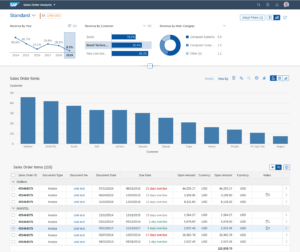
Fiori Elements: Best SAP Integration and Extensibility
- Integration with SAP Backend: Fiori Elements seamlessly integrates with SAP backends, making it easy to connect to and work with SAP data sources, such as OData services.
- Fiori Launchpad Integration: Fiori Elements applications can be seamlessly integrated into the SAP Fiori Launchpad, providing a central access point for SAP applications and enabling a unified user experience.
- Extensibility: You can extend Fiori Elements applications to meet specific business requirements. Custom logic and UI components can be added when necessary, allowing for flexibility in application design.
Cutting-edge mobile technology and low maintenance
- Built-In Annotations: Fiori Elements utilizes metadata annotations to define application behavior, data sources, and UI controls. This approach simplifies the development process and enables greater consistency in applications.
- Support for Smart Controls: Fiori Elements supports smart controls, which are dynamic UI elements that automatically adapt to the context. Examples include smart filters and smart tables, which enhance user interactions and productivity.
- Role-Based Access Control: Fiori Elements allows developers to implement role-based access control, ensuring that users only have access to the functionality relevant to their roles and responsibilities.
- Low Maintenance: Since Fiori Elements leverages common UI patterns, updates to the framework can automatically propagate to your applications. This helps ensure that your apps stay up to date with the latest SAP UI design standards.
- Simplified Testing and Maintenance: The standardized approach of Fiori Elements simplifies testing and maintenance by using common components and design patterns throughout applications.
Not all that glitters is gold
While it offers many advantages, it also has some disadvantages and limitations that developers and organizations should consider and that are worth to mention in this context from our perspective:
- Limited Customization: Fiori Elements is highly opinionated and enforces a standard UI design and structure. This means that extensive customization can be challenging. If your application requires a unique look and feel or complex functionality, Fiori Elements may not be the best choice.
- Complex Requirements: Fiori Elements is suitable for simple to moderately complex applications. For highly complex scenarios with unique business logic, complex data processing, or non-standard UI elements, custom development may be necessary.
- Limited Control Over UI: Developers have limited control over the user interface when using Fiori Elements. This benefits standardization but can disadvantage customization when needed. Complex layouts and UI elements may require a more custom approach.
- Vendor Lock-In: SAP primarily develops and maintains Fiori Elements, which is based on open standards. This could lead to a level of vendor lock-in, as you might rely heavily on SAP for updates, bug fixes, and improvements.
Despite these disadvantages, SAP Fiori Elements can be a valuable choice for organizations looking to quickly develop standardized, Fiori-compliant applications with less custom development effort. However, careful consideration of your specific requirements and constraints is crucial when deciding whether to use Fiori Elements or opt for custom development using SAPUI5 or other UI frameworks.
ContactIf you’re excited about the potential of SAP Fiori Elements and how they can transform your business processes, we’re here to help! Our team is ready to guide you through implementing Fiori Elements, ensuring a seamless integration that maximizes your efficiency and user experience. Don’t hesitate to reach out to us for expert advice and support tailored to your unique needs. Let’s make your SAP journey even more successful!
