Many organisations have relied on SAP CRM for more than 15 years to support their sales and service operations. As these systems grow, users often accept slow start pages, sluggish worklists and long search times as an unavoidable consequence of running a legacy platform. They shouldn’t.
In a recent customer engagement, we analysed a productive SAP CRM system, which runs on a Oracle database, and discovered that only a handful of inefficient database accesses caused the vast majority of the runtime. By optimising the SQL statements, database indexes and ABAP implementation, we significantly improved system performance—without changing a single business process.
1. Identify the Real Bottleneck in SAP CRM
Never optimise blindly. Start with a SQL trace in ST12 or ST05 and identify where the database actually spends its time.
In our analysis, a single SQL statement consumed 87% of the complete start page runtime. The execution plan immediately revealed the problem: Oracle performed a full table scan on CRMD_PARTNER before joining several SAP CRM tables with a custom application table.
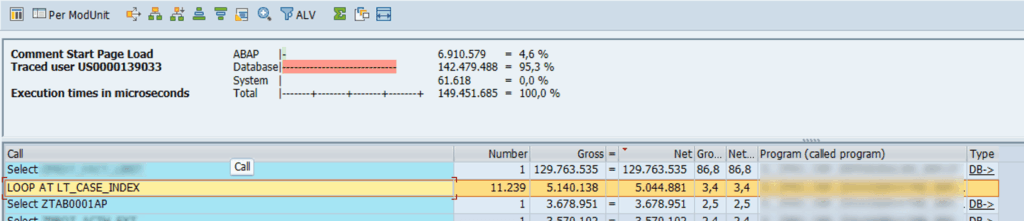
The problem was more or less clear and we had to redesign the query. We split a complex SQL statement with many INNER JOIN and ON condition into two dedicated SQL statements. An inefficient SQL statement was replaced with a 2-step approach:
- Part 1: Team-based access (uses
FOR ALL ENTRIESon zzteam_id) - Part 2: Logged user access (no
FOR ALL ENTRIES, simple bind)
These changes allowed the database optimiser to use indexes much more effectively and dramatically reduced the amount of data it had to process.
Lesson learned: The biggest performance gain often comes from rewriting one inefficient SQL statement—not from buying faster hardware.
2. Build the Right Indexes
Many SAP CRM systems contain custom developments that have been running successfully for years. Unfortunately, data volumes rarely remain the same. As databases grow, queries that once completed within milliseconds suddenly require full table scans across millions of records.
During our analysis we found missing indexes on both standard SAP tables and customer-specific Z-tables, including:
- CRMD_PARTNER
- CRMD_LINK
- CRM_JEST
- CRMD_ORDER_INDEX
- Custom application tables
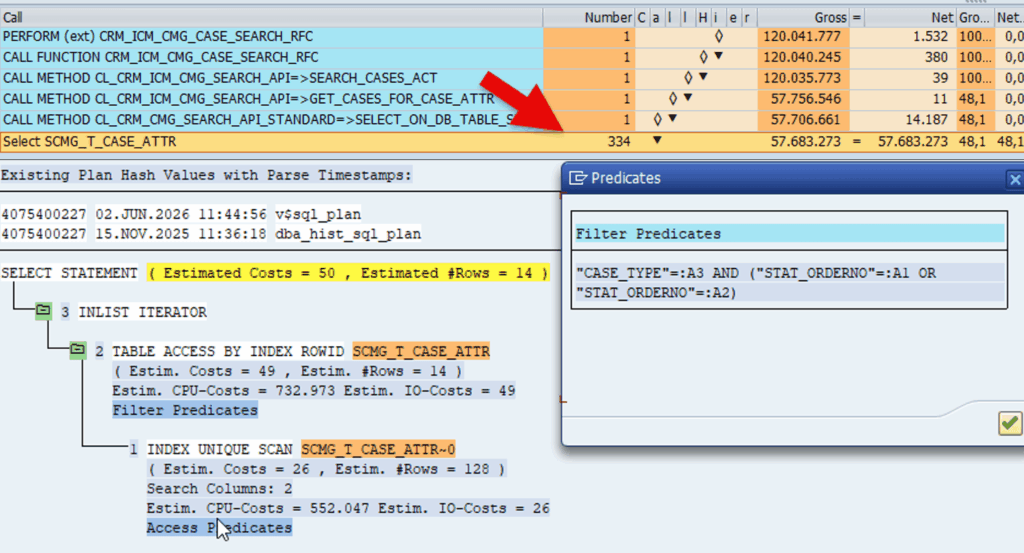
Instead of creating indexes randomly, we analysed the execution plans and created new index for the different scenarios and measured the gain. The result was fewer logical reads, fewer random I/O operations and substantially faster response times.
Lesson learned: Indexes should support your SQL—not simply exist because the table is large.
3. Optimise the ABAP, Not Only the Database
Performance tuning doesn’t stop at the database. Sometimes a single ABAP statement prevents Oracle from using an index efficiently. For instance SAP stores dates as YYYYMMDD character strings and any real date is always greater than ‘00000000’. For example, replacing
WHERE ( zz_aufb_dat2 NE '00000000' )
with
WHERE zz_aufb_dat2 GT '00000000'
transforms a non-sargable predicate into an index-friendly range condition.
Likewise, removing outdated Oracle optimizer hints can improve performance dramatically. In one analysed program, an index hint forced Oracle to perform more than 10,000 random row lookups, even though a sequential full table scan would have completed much faster.
Lesson learned: Trust the optimiser—provided it has accurate statistics and you don’t force it into an inefficient execution plan.
4. Stop Loading Data Nobody Uses in SAP CRM
Another common issue had nothing to do with SQL.
Several programs loaded thousands of records into internal tables although the SAP CRM WebUI displayed only a small subset of the data.
Ask yourself:
- Does the user actually see every selected record?
- Can the application restrict the selection at database level?
- Can the SQL statement perform the filtering instead of ABAP loops?
Reducing unnecessary data retrieval lowers database load, decreases application server processing and improves the user experience immediately.
Lesson learned: The fastest record is the one you never read.
5. Maintain Your Database
Many legacy SAP CRM systems suffer from outdated database statistics.
Without accurate statistics, Oracle cannot estimate the selectivity of predicates correctly, as outlined in SAP Help as well. As a result, it often chooses full table scans where efficient index access would be significantly faster.
Before changing application code, always verify that the database statistics reflect the current data distribution. Refreshing statistics in DB20/DBACOCKPIT or DB13 is often one of the simplest—and most effective—performance improvements you can make.
Lesson learned: A well-maintained database optimiser makes better decisions than outdated statistics ever will.
Legacy Doesn’t Mean Slow
Running SAP CRM for 15 or 20 years doesn’t automatically mean users have to accept poor performance.
A structured performance assessment can uncover bottlenecks that have accumulated over many years of productive operation. By combining SQL trace analysis, execution plan reviews, ABAP optimisation, carefully designed indexes and database maintenance, you can often reduce response times dramatically while preserving your existing business processes.
At Redcup Code, we specialise in modernising and optimising mature SAP CX and CRM landscapes. Before planning an expensive migration, ask yourself one question:
Is your SAP CRM really slow—or is yesterday’s SQL simply struggling with today’s data volumes?