
A few weeks ago we wrapped a project where the customer asked the classic question: “Which UI5 version should we run in production?” Tempting as it is to jump on the latest shiny build, our answer was simple. Learn more about the UI5 versions and how to consider the right one in your scenario.
Go with a stable, high-patch LTS line instead of the newest innovation drop.
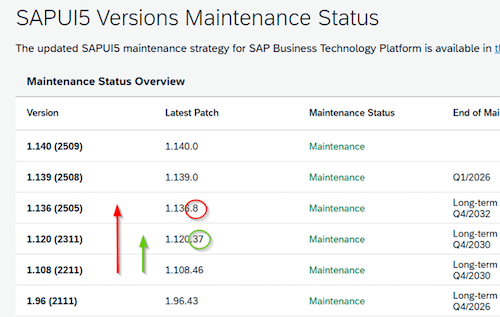
Example: rather than 1.136.8 (new feature train, fewer patches, more churn), pick 1.120.37 (LTS with a long tail of fixes). In production, be defensive, not adventurous.
If you want to see what’s currently maintained, SAP’s UI5 Version Overview lists the available trains and their maintenance status. (ui5.sap.com)
SAP also documents how innovation vs maintenance/LTS streams work and how their lifecycles differ. (help.sap.com)
Why the “boring” LTS is smarter
- Lower regression risk. High patch levels come with fixes vetted by lots of real-world usage. Fewer surprises for your users.
- Longer maintenance window. LTS lines get security and bug patches for longer—less pressure to hop versions mid-year.
- Predictable behavior. Innovation lines move fast; LTS lines change gently, which makes your upgrade planning saner.
Practical rules we use at Redcup Code
- Start with an LTS. Only deviate if a must-have feature exists only on an innovation line—and plan to move back once it’s back-ported or the next LTS arrives.
- Always pick the highest patch on that LTS. For example, if you’re on 1.120.x, choose the newest x available. (Release notes and version overviews help you target the latest patch.) (sapui5.hana.ondemand.com)
- Upgrade in steps, not leaps. Minor → next minor, with smoke tests in between.
- Feature-flag risky changes so you can turn them off without rolling back the framework.
- Keep a rollback path. Make the UI5 version a config so you can flip back quickly if needed.
When to consider an innovation line (like 1.136.x)
- You depend on a specific new control/behavior not back-ported to LTS. Before you jump, verify that the feature isn’t scheduled for quick back-porting and check its API stability in the samples/release notes. Do a short spike (1–2 days) to confirm performance, accessibility, and theming fit your app. Capture any gaps and wrap usage behind a small abstraction so you can retreat to LTS without widespread refactoring.
- You’re prototyping, not shipping to critical users. Innovation lines are perfect for discovery work where occasional breaking changes are acceptable. Keep the prototype in a separate branch or workspace, and make sure stakeholders know it’s exploratory (no SLA). When the approach hardens, rebuild the minimal viable slice on the LTS train.
- You’ve budgeted time for fixes and have strong automated tests. Plan explicit buffer for regressions (think: 10–20% of the iteration) and run dual-track CI (current vs. target UI5). Aim for smoke tests that cover: app boot, a representative search/filter flow, navigation, and one write path. Add a feature flag/canary rollout so you can enable the innovation build for a subset of users first and flip back instantly if telemetry or error rates spike.
Our selection checklist (steal this)
- Business critical? → LTS.
- New feature only in innovation? → Short-term innovation branch, gated behind feature flags.
- Do we have automated tests? If “not really,” that’s another vote for LTS.
- Go-live window tight? LTS again.
- Security posture? Stick to a maintained line with current patches.
How we operationalize this on projects
- Dual-track test runs: CI executes your smoke tests against current and target UI5 versions before merging.
- Version pinning: We pin the exact UI5 minor/patch for prod; Dev can float within the same line for early detection.
- Release notes scan: We scan UI5 release notes for breaking changes/regressions that touch your controls. (sapui5.hana.ondemand.com)
- One-click rollback: The UI5 URL/version is configured—not hardcoded—so ops can revert quickly if needed.
Real talk from the recent project
The customer initially leaned toward the newest innovation build to “future-proof” the app. In practice, that meant chasing small behavior changes during a time-sensitive release. We switched to 1.120.37—an LTS with a deep patch history—and the release went quiet: fewer unexpected diffs, easier testing, and happier users.
If you’re deciding today, start with the highest patch on an LTS line. Save the excitement for your features—not your framework.
Want a quick sanity check for your app? We’re happy to review your UI5 version choice, test coverage, and rollback plan—and help you land on the right train.
